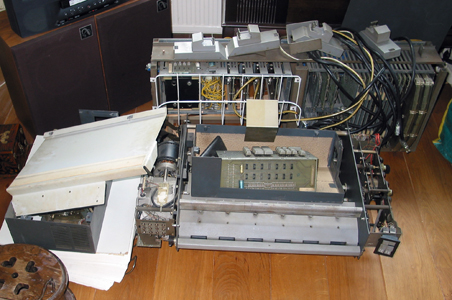
Donations in a condition like these remainders of a Philips office computer will usually be rejected...
Rubber rollers of Documation card reader
In our collection are a number of Documation punched-card readers. These readers suffer to various degrees from the problem that the
rubber-like (*) card picker rollers have deteriorated, as a result of not being used for a long time, and/or having been improperly
stored.
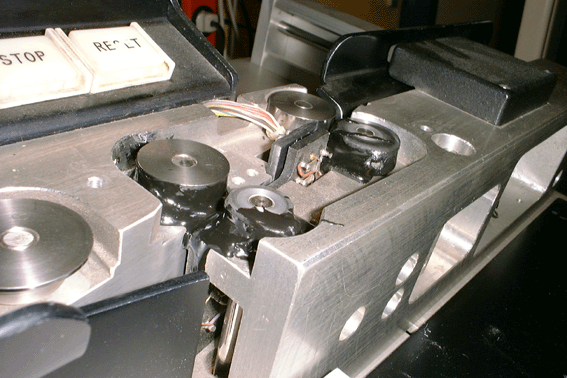
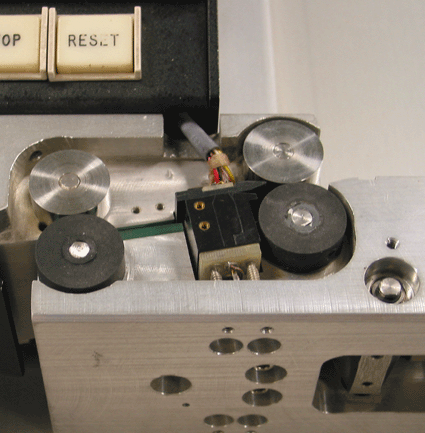
The rollers, though seemingly useable at first, were observed to heat up rapidly after a couple of minutes of use. One day, probably as a result of exceeding a critical temperature, they changed state all at once, forming a viscid substance which covered and glued together nearby parts of the machine. For instance the opposite metal rollers (see the picture of our Documation M1000) turned out to be rubber-coated afterwards. The molten 'rubber' solidified after some time, forming a sticky mass.
The capability of reading cards is considered a major feature of our museum. Fortunately, we found a Dutch rubber processing firm (**) up for making a new, experimental set of rollers (experimental because little is known about the necessary mechanical properties of the material; notice that the rollers rotate at about 2000 revolutions per minute and that they are subject to appreciable forces). These rollers from EPDM45 rubber seem to be functioning satisfactorily.
The picture shows them mounted in a Documation M300 card reader.
(*) Using FTIR spectrometry, the material was identified as polyurethane rubber with chalk and silica additivies. Thanks to Mrs. Thea van Oosten of ICN (Institute Collection of the Netherlands, Amsterdam).
(**) HADA, Alkmaar, now defunct.
Capstans
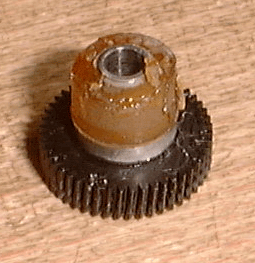
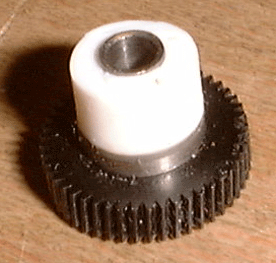
Hewlett & Packard seem to have used the same type of capstan material in all magnetic media drives appearing in their products in our collection, ranging from pocket calculator card readers to cassette tape drives of various sizes. In no case this material has survived the 15 - 20 years since it was applied, virtually independent of storage conditions. Instead it has turned into a spongy, sticky substance.
The left picture shows the capstan of the program card reader of a HP-67 calculator. In the right picture an attempted reconstruction is shown, made from silicone casting. Though we have tried several grades of this material, in no case the new capstan would function properly. Probably the coefficient of friction of these silicone rubbers is too low, which is not surprising because they are designed for making removable casting molds.
More examples of plastic deterioration
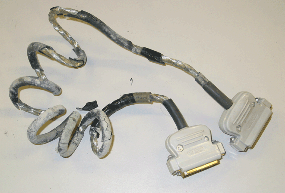
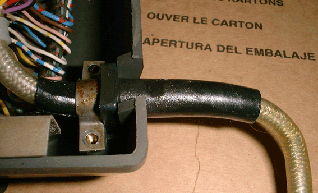
The left picture shows the internal connection cable of our Tektronix 4002A graphics terminal. The cable sleeve has completely fallen apart, the remaining pieces being very brittle. Right picture: close-up of a Diehl paper tape reader. The black plastic sleeve is 'sweating' softening agent.
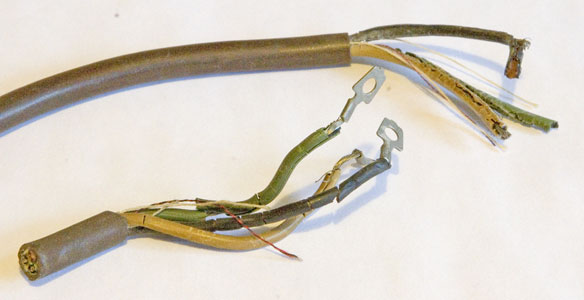
On the outside this Flexowriter power cable seemed to be in perfect condition. However, during a demonstration (!) of the machine, a short-circuit blowed the mains' fuses. A potentially dangerous situation.
Battery backed-up RAM
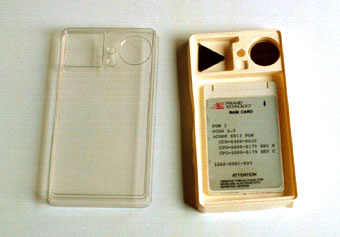
The left picture shows a RAM card (about the size of a credit card) in its storage box, together with a silver oxide cell and a tool for inserting the latter into the card.
The card contains in battery-backed-up RAM the bootstrap program of a Pyramid MIServer MIS-4 (a fast dual-processor Unix machine).
Unfortunately the battery has lost its power for long, whence it is impossible to bootstrap the machine. Even if it were possible to obtain a fresh card from the manufacturer (which isn't so), the same problem would appear again after a couple of years of storage in our depot.
(Note: the Pyramid machine was removed from the collection in 2005).
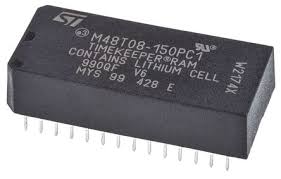
A similar problem poses the 'watchdog'-ic with built-in lithium battery (right picture). It is found in many machines from SGI and Sun Microsystems (and probably more brands). This ic houses a real-time clock and 'non-volatile' RAM holding important system parameters. If the battery is empty, the system won't boot.
Fortunately, replacement watchdogs are still (2016) easily available and relatively inexpensive. However installing a fresh watchdog is not a completely trivial task.
Leaking CMOS battery
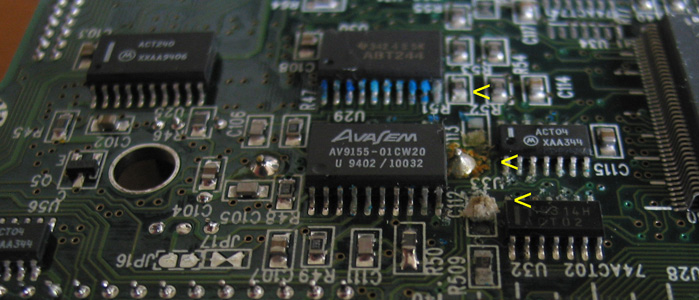
The picture shows the bottom side of the circuit board from a HighScreen notebook computer. Soldered on top of this board is a small NiCd battery for CMOS backup. This battery was leaking chemicals, which even reached the bottom side shown through some of the small through-plated holes in the board. As a result both sides of the board were ruined beyond repair. Depending on the place where it attacked, the contents of de battery caused at least three types of contamination (indicated by arrowheads): blue, brown and whitish.
Laptop main battery
The main battery of a laptop computer entering our collection is invariably over of its useful lifetime. Replacement batteries can still be ordered, sometimes even if the laptop is twenty years old. But these are expensive, and in a museum collection which is to last for the next 100 years, they are no solution. Fortunately, most laptops can be operated without this battery if that is what you want (but you still need an intact CMOS-battery, see previous topic). In some laptops, however, the battery pack is part of the outer case of the machine. I don't know how the chemistry of defunct cells will behave on the long run, but I am not optimistic. So I would either remove the battery and store it separately (for inspection after 100 years), or carefully open it and remove the cells.
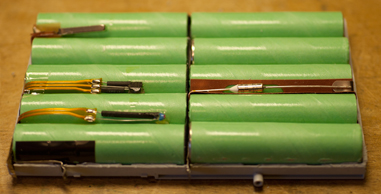
The picture shows the contents of a 12 V, 2300 mAh battery taken from a DECpc laptop (1993). There are 10 NiMH cells, protected by four sensors. Two of these are connected to an internal circuit board with many IC's (picture below). Do not attempt (as I did) to replace the cells by fresh ones. The current sensors (fuses, in fact) are point-welded into the original circuitry, and will be irreversibly tripped as soon as you touch them with a soldering iron. The replacement cells will necessarily be different in size (smaller) and electrical properties, so you cannot be sure that the control electronics will work appropriately. Learn from this article that there are many more reasons to have doubts on this issue.
smart-battery control circuit
Poor storage conditions
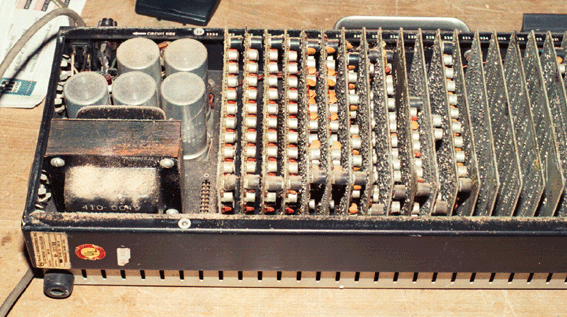
Our Wang 300 calculator system has probably been stored for many years in a shed or garage. In the 'electronics package' shown we found sawdust, dabs of paint, rust and unidentified chemicals. For cleaning, the unit had to be taken apart entirely.
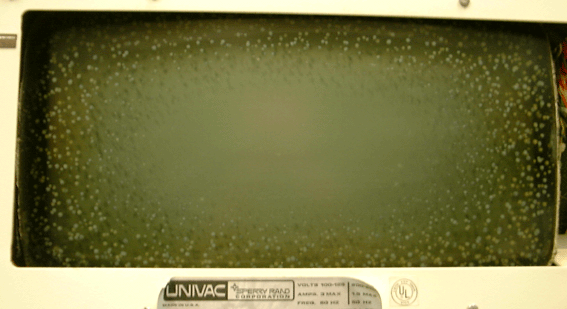
Mouldy spots on CRT faceplates
Many cathode-ray tubes in terminals from the 70's and 80's show the
development of fungi between the glass surface of the tube and its
protecting plastic faceplate. This phenomenon gives a terminal
particularly unhealthy looks, although it doesn't impair its
functionality.
The only way to attack this problem seems to be removing, cleaning
and replacing the faceplate, which is probably a tricky and even
dangerous business.
Dirty keyboards
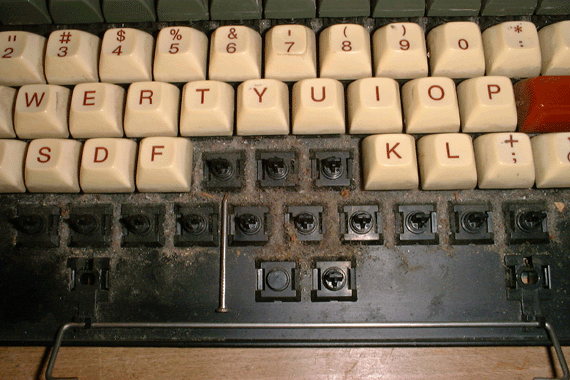
Keyboards coming with used computers are usually quite dirty; not only the keys but also the space beneath them, where often massive amounts of dust and objects like nails (see the picture), remainders of coffee and bread, and so on have collected. Cleaning good quality keyboards (removable caps, hermetically closed switches) is not particularly difficult but rather time consuming. Don't forget to take a picture of the keyboard before removing the keys!
Defective harddisks
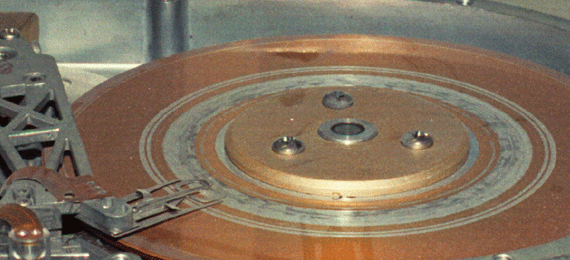
When hard disks still were very expensive, a crashed disk was often the reason to replace the complete computer. We found this disk drive in an Apple Lisa computer. It has been acting as a milling machine. Probably the read/write head has come loose after a hard landing on the disk. Evidently, this kind of damage is beyond repair....
Poor choice of display method
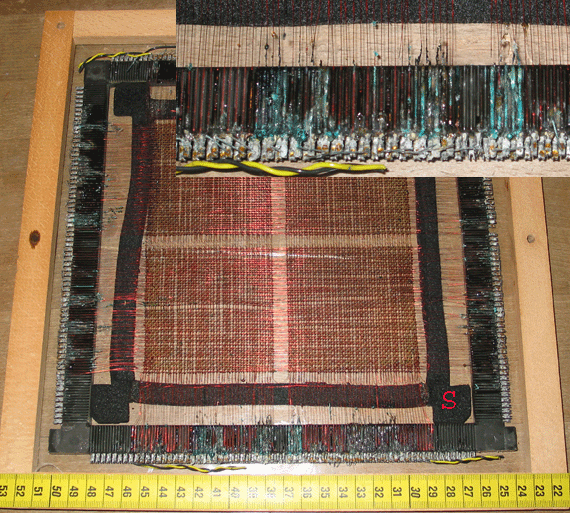
The picture shows a core memory plane (one from a stack), for educational display enclosed in a wooden frame with perspex windows, somewhere in the early 80's. The plane was held in place by a pair of black spacers marked S, probably made of PVC foam. These spacers were taken from the original core stack. In this picture the upper spacer and window have been removed.
Unfortunately, softening agent from the spacers has escaped from the foam, and because the space was hermetically closed, it has condensed as a clear oily fluid on the windows, and on the memory plane itself. There it has caused severe, irreversible damage; see the enlarged part of the picture.
Development of rust on a steel surface
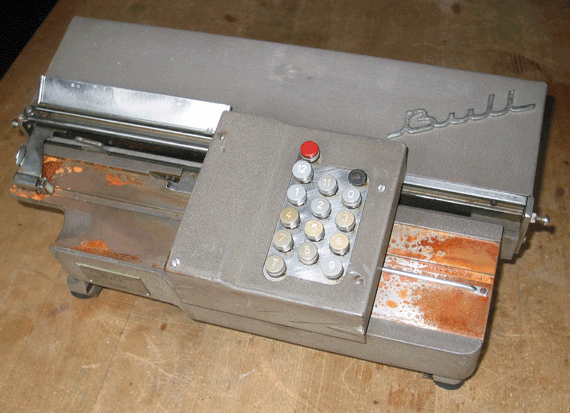
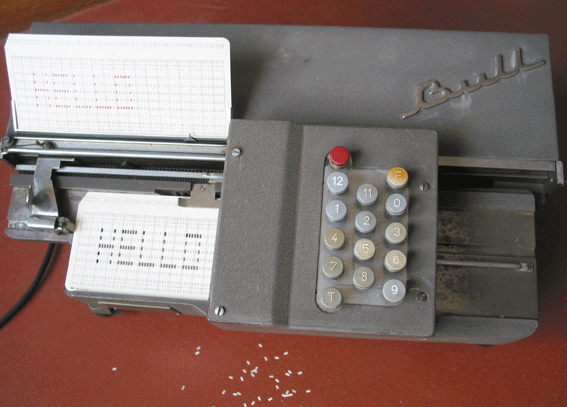
The picture shows the rusty card track of a Bull POR-80 electric-powered card punch (about 1952). Though the amount and type of rust looks very discouraging, it can be removed easily using a small glass-hair brush. Fortunately, there wasn't much rust under the keypad, as removing the latter (in a reversible way) is a complex problem. After removing the rust, replacing the mains cable and a missing key cap (borrowed from a similar machine in a much worse condition), cards can be punched with the machine as if it never has been out of service; see the picture.
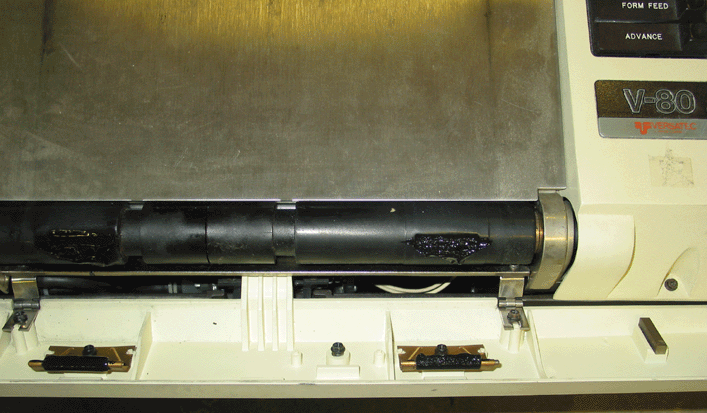
Molten rubber platen of a Versatec plotter
Another sad story about disintegrating (synthetic) rubber.
This is the paper transport mechanism of a Versatec V-80 electrostatic plotter, built around 1972. Normally the front lid is closed, and the paper is fed between the large rubber platen and a pair of small plastic idlers mounted on the lid. (Actually the platen is in two halves, coupled by a differential gearing).
In the course of time the rubber of the platen has softened to the point of being almost fluid. The idlers left deep impressions and were themselves covered with the sticky, syrup-like platen material.
Cables - a computer collector's nightmare
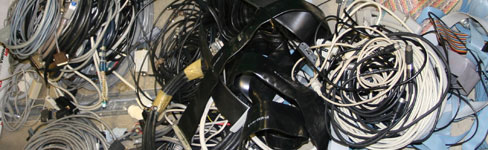
Which cables and/or connectors should be kept for possible future use, or possibly just for historical reasons? How should they be conserved and stored? How to be described and labeled? How to preserve essential cables (either internal or interconnecting) already having a decaying sleeve?
Removing adhesive tape remainders
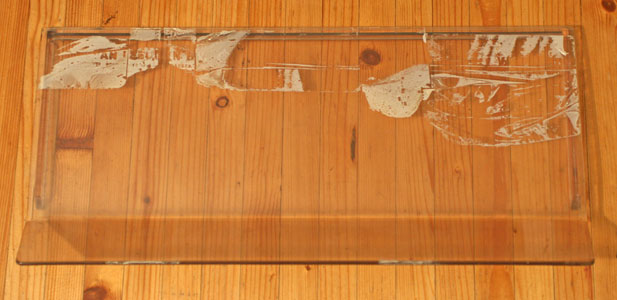
This is the protecting screen of the printer/keyboard, part of the IBM 1050 Data Communications System.
Many years ago, the teleprinter has been wrapped up in furniture mover's adhesive tape. Even while most of the by now degraded tape could be removed easily, it left sticky traces all over the machine; probably a mix of glue, and softening agent escaped from the substrate. Most of this could be removed using isopropyl alcohol without affecting the plexiglas screen. Unfortunately, in many spots there were remnants of the tape, still covering the glue. Mechanical means for removing these (like a scalpel) would certainly cause scratches. On the internet I found a suitable method. After applying a little cooking butter and having it settle for a few minutes, the tape and glue residuals could be wiped off without leaving a trace! Unfortunately, the trick doesn't work on other plastic (probably PVC) parts of the machine.
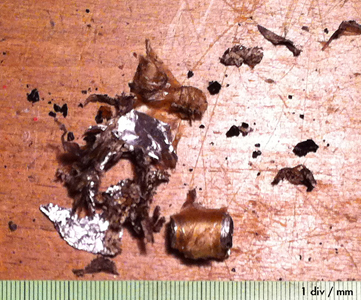
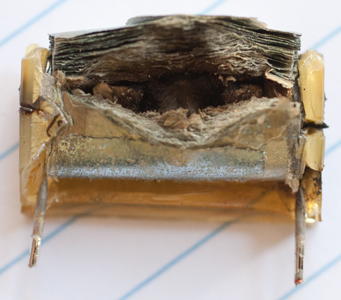
Most motor-driven mechanical calculators are equipped with an anti-EMI capacitor, bridging the mains input. These capacitors have a tendency to explode, when the calculator is switched on after many years of leisure. Such explosions can be hefty, producing a toxic-smelling fume and spreading small particles all over the mechanism.
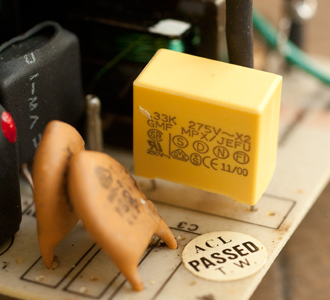
Exploded EMI capacitor from AppleII power supply, replaced by modern capacitor (yellow)
EMI capacitors are also found in modern switched-mode power supplies. Though of more advanced design then those used in the electromechanical calculators of the 1950's, they can still manifest themselves unexpectedly and unpleasantly. See this article.
Defective tape cassettes
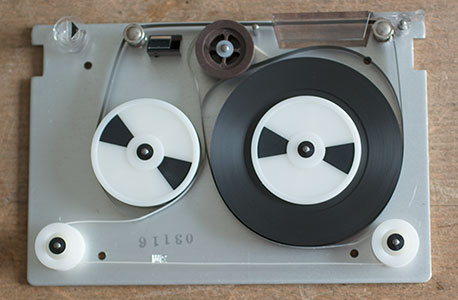
Cassette cover removed.
This QIC (quarter-inch cassette) tape contains software for our recently acquired Tektronix 4501 computer (1976). Unfortunately it is not readible, because the white drive band inside the cassette is broken. As it turned out, all of the ten Tektronix system software cassettes had the same problem, as well as another ten unused Scotch cassettes which came with the computer.
It is possible to replace the culprit by a band cannibalized from a newer unused QIC; evidently this is useful only if the magnetic databits on the tape are still there!
See this youtube movie.